Direct support
Contact TwoQM for support and follow your conversations in the workspace. Access follows your authorized business and connected services.

A TwoQM product
A secure customer workspace with a mobile app for authorized business users. Keep account coordination and operational workflows close to the team that develops your technology.
Client LoginTwoQM Central + mobile
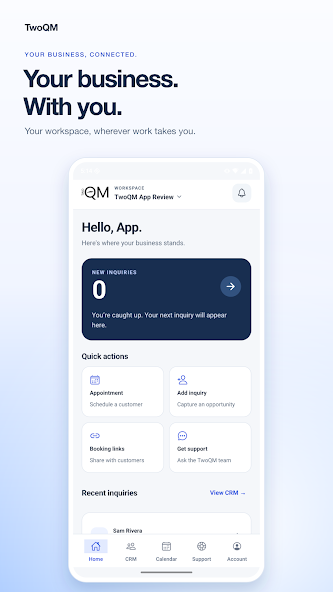
Receive your website leads, set up appointments, and contact TwoQM for support—all in one business workspace.
Keep lead notes and follow-up organized, manage your appointment schedule, and follow support conversations. Access depends on your authorized business and connected services.
An existing Central account and authorized business access are required. An internet connection is needed to load or save records. Public iOS availability has not been confirmed.
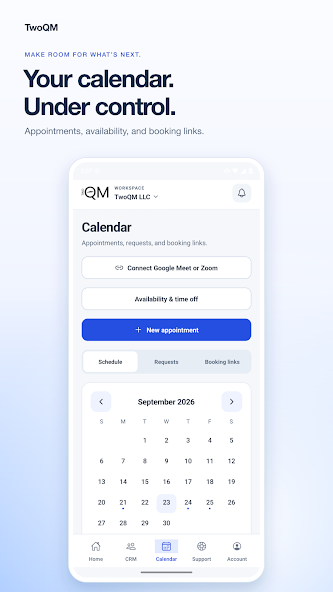
Appointments & availability
Authorized businesses can organize appointments, set availability, block time off, and share booking links. Meeting-provider connections are optional and require setup.
Official TwoQM store screenshot with demonstration content.
Contact TwoQM for support and follow your conversations in the workspace. Access follows your authorized business and connected services.
The mobile app supports inquiries, notes and status, appointments and availability, website revision review, and support. Business selection and permissions determine which records and actions you can use. Meeting-provider options require configuration.
Before you start
Yes. Use your existing TwoQM Central account and businesses you are authorized to manage. New project inquiries do not require an account.
No. Available features depend on connected websites, services, account roles, and optional provider integrations.
The Android app is publicly listed on Google Play. Public iOS availability has not been verified; contact TwoQM about access.
Central connects specific customer and business workflows. We review your operational needs and integrations before proposing additional software.